Every driver wants a safe journey, and keeping your tires at the right pressure is a big part of this. Many Honda vehicles have a Tire Pressure Monitoring System (TPMS) that alerts you when your tire pressure is too low. But after you inflate your tires, sometimes the warning light stays on, and you wonder what to do next. Resetting the Honda tire pressure system is simple once you know the steps, but there are some important details you should not miss. In this guide, you’ll learn how to reset Honda tire pressure, understand why the light comes on, and discover tips that most people overlook.
Why Tire Pressure Matters For Your Honda
Tire pressure affects more than just your ride comfort. If your Honda’s tires are underinflated or overinflated, you may experience:
- Reduced fuel efficiency
- Shorter tire lifespan
- Less grip and longer braking distance
- Higher risk of tire failure
A study by the National Highway Traffic Safety Administration found that about 1 in 4 cars has at least one underinflated tire. This can increase your stopping distance by up to 10%. For Honda owners, the TPMS is a great tool to keep you safe, but you need to know how to use it properly.
Common Reasons The Honda Tire Pressure Light Comes On
Before you reset the warning light, it’s smart to understand why it appeared. Some common reasons include:
- Temperature changes: Cold weather can lower tire pressure overnight.
- Punctures or slow leaks: Nails or damaged valves cause air to escape.
- Seasonal air loss: Tires naturally lose a bit of air over months.
- Tire rotation or replacement: After changing or rotating tires, the system may need a reset.
If you see the TPMS light, always check your tires with a pressure gauge before resetting. Never ignore the light, as it could mean a real safety issue.
How Tpms Works In Your Honda
The TPMS uses sensors inside each tire or in the valve stem. These sensors measure air pressure and send signals to your car’s computer. If any tire drops below a set level, the warning light appears on your dashboard.
Some Honda models use “direct” TPMS (each wheel has a sensor), while others use “indirect” TPMS (the system watches how fast your wheels turn). Understanding your Honda’s system helps you reset it correctly.
Tpms Type Comparison For Honda Models
| Honda Model | TPMS Type | Reset Method |
|---|---|---|
| CR-V (2014+) | Indirect | Menu Button/Screen |
| Civic (2016+) | Indirect | Menu Button/Screen |
| Accord (2013+) | Indirect | Menu Button/Screen |
| Pilot (2011-2015) | Direct | Button/Manual |
| Older Hondas | Direct | Physical Button |
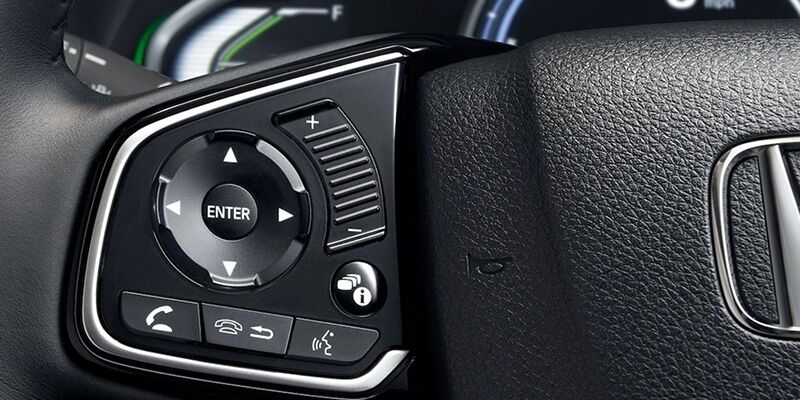
Many newer Hondas use indirect TPMS, which means you usually reset the system using the car’s menu, not by pressing a physical button.
Step-by-step: How To Reset Honda Tire Pressure
Resetting your Honda’s TPMS is easy if you follow the right steps. Below you’ll find instructions for both newer and older models.
For Newer Hondas (2013 And Later)
Most newer Honda vehicles (like Civic, Accord, CR-V) use an indirect TPMS. Here’s how to reset:
- Turn on the ignition but do not start the engine.
- Inflate all tires to the recommended pressure. You’ll find the correct numbers on the driver’s door sticker (usually 32–35 psi).
- Use the vehicle’s menu:
- Find the Home or Settings button on your dashboard or touchscreen.
- Look for Vehicle Settings or TPMS Calibration.
- Select TPMS Calibration and choose Calibrate.
- Drive your car for about 20–30 minutes at more than 30 mph. The system will learn the new pressures and turn off the warning light.
Example: Resetting Tpms On A 2020 Honda Cr-v
- Press Home
- Go to Settings
- Scroll to Vehicle
- Select TPMS Calibration
- Tap Calibrate
For Older Hondas (2012 And Earlier)
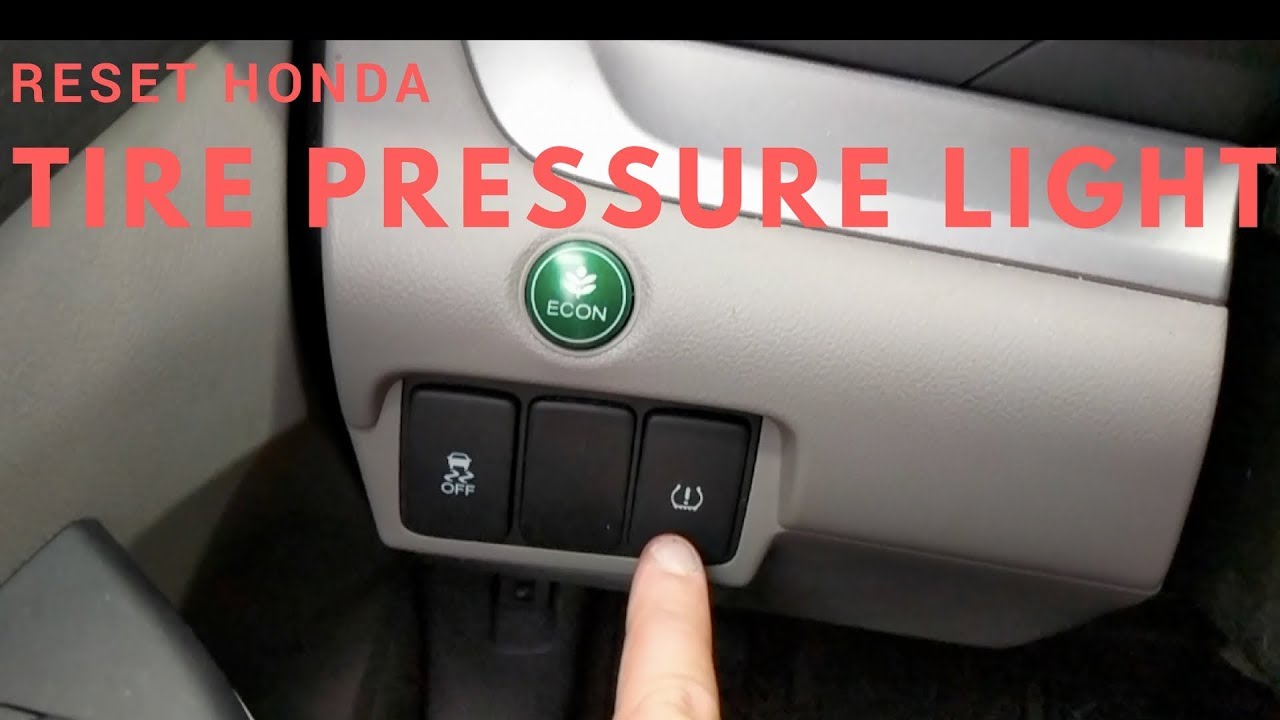
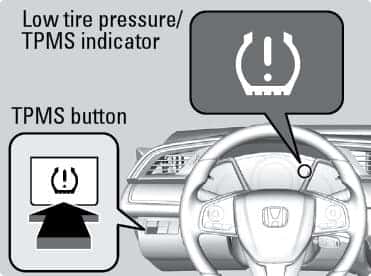
Older models (like the 2011 Pilot or 2012 Accord) often have a physical TPMS reset button.
- Turn the ignition to ON (engine off).
- Inflate all tires to the recommended level.
- Find the TPMS button. It’s usually under the dashboard, left of the steering wheel.
- Press and hold the TPMS button until the light blinks twice.
- Release the button. The system will recalibrate as you drive.
After Reset: What To Expect
After you reset, the TPMS light should turn off after driving for a short time. If the light stays on, recheck your tire pressures and repeat the steps.
Table: Common Honda Tpms Reset Options
| Year/Model | Reset Method | TPMS Button Location |
|---|---|---|
| 2016 Civic | Menu Calibration | N/A |
| 2010 CR-V | Physical Button | Below Dashboard |
| 2019 Accord | Menu Calibration | N/A |
| 2011 Pilot | Physical Button | Left Side, Under Wheel |
What To Do If The Honda Tire Pressure Light Stays On
Sometimes, the TPMS warning stays on even after you’ve checked and inflated all tires. Here’s what you should do:
- Double-check all tire pressures, including the spare tire. Some Hondas monitor the spare as well.
- Inspect for leaks or damage. Use soapy water to check for bubbles at the valve stems or tread.
- Drive the car for at least 10–20 miles. Sometimes, the system needs time to update.
- Turn the car off and back on. A simple reboot can help the computer recognize changes.
If the light still doesn’t go off, your TPMS sensor may be faulty or need professional attention.
When To Visit A Mechanic
Most TPMS problems can be solved at home, but some need expert help. Contact your dealer or mechanic if:
- The TPMS light flashes (not just stays on). This usually means a sensor issue.
- You see both the TPMS and the Check Engine light at the same time.
- You replaced a tire or battery and the system won’t reset.
Non-obvious tip: Some tire shops can accidentally damage TPMS sensors when changing tires. If your light appears right after service, ask them to check the sensors.
Two Insights Many Honda Owners Miss
- Seasonal Temperature Can Trigger False Alarms: In cold mornings, your tire pressure drops naturally. The TPMS might come on even if tires are not leaking. Inflate tires when they are cold (before driving), not after a long trip.
- TPMS Needs Time to Learn: The system doesn’t update instantly. After resetting or inflating, it might take a few miles of driving for the warning to disappear. Don’t panic if the light doesn’t go off immediately.
How To Keep Honda Tire Pressure At The Right Level
Regular checks are better than just waiting for the warning light. Here’s a simple way to build a habit:
- Check tire pressure once a month.
- Always check before long trips.
- Use a reliable digital gauge for accuracy.
- Adjust pressure when tires are cold.
Comparing Tire Pressure: Cold Vs. Hot
| Condition | Typical Pressure Reading | What to Do |
|---|---|---|
| Cold (before driving) | 32-35 psi | Use this number for setting pressure |
| Hot (after driving) | +3 to +5 psi | Do not let air out when hot |
Credit: www.youtube.com
Tips For Avoiding Honda Tpms Problems
- Replace valve caps after inflating. This keeps dirt and water out of the sensor.
- Don’t ignore slow leaks. Small punctures can trigger the warning and damage the sensor.
- Tell the tire shop you have TPMS. They need to use care when changing tires.
- Check the spare tire in older models. Some Hondas monitor the spare tire too.
What If You Don’t Reset The System?
If you never reset the TPMS after inflating tires, the warning light may stay on. You could start to ignore it, which is dangerous because you won’t know if a real problem happens. Always reset after fixing the pressure so the system can protect you.
Credit: www.geraldhondacountryside.com
Extra: Resetting After Tire Rotation Or Replacement
When you rotate or replace tires, your Honda may need a TPMS recalibration even if the pressure is fine. Follow the same menu steps as resetting after inflation. Some shops forget this step, so ask them before you leave.
Where To Find Honda Tire Pressure Information
Your best sources are:
- The driver’s door sticker (shows correct pressure)
- The owner’s manual
- Honda’s official website: Honda Owners
Credit: www.bianchihonda.com
Frequently Asked Questions
How Often Should I Check My Honda’s Tire Pressure?
Check tire pressure at least once a month and before long trips. Tires naturally lose air over time. Checking regularly keeps you safe and improves fuel economy.
Can I Drive With The Honda Tire Pressure Light On?
It is not safe to ignore the warning. The light means at least one tire is below the safe pressure. Driving with low pressure can cause uneven tire wear, poor handling, or even a blowout.
Does The Tpms Monitor The Spare Tire?
On some older Honda models, the TPMS also checks the spare tire. If you’ve checked all four tires and the light is still on, check the spare’s pressure too.
How Do I Find The Right Tire Pressure For My Honda?
Look at the sticker inside the driver’s door or check your owner’s manual. Do not use the number printed on the tire’s sidewall, as that is the maximum pressure, not the recommended setting.
What Should I Do If The Tpms Sensor Is Damaged?
If a sensor is broken or missing, the TPMS light will flash. Visit a Honda dealer or a trusted mechanic to replace or repair the sensor. Most sensors last 5-7 years but can be damaged during tire changes.
Keeping your Honda’s tire pressure correct is simple, but easy to overlook. By checking your tires regularly, knowing how to reset the TPMS, and paying attention to warning lights, you stay safe and avoid costly repairs. Remember, the TPMS is there to help you, but it needs your attention to work properly.
Safe travels!